
Categories
Category Management
You can edit some categories here. One category can have many items.
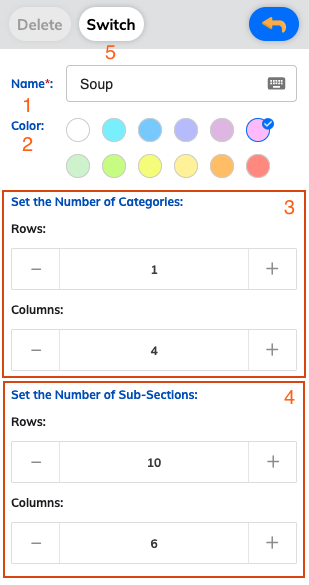
Category Configuration Options
- Name: you can enter the category name here
- Color: you can choose the category color here
- The number of Categories: you can modify the number of category rows and columns here
- The number of Sub-Sections (items): you can modify the number of sub-section rows and columns
- Switch: you can switch the category position by tapping the category → tap Switch → tap another position
How to Manage Categories
Adding a New Category
- Navigate to the Category section in Edit Menu
- Enter a descriptive name for your category
- Choose an appropriate color to help distinguish it visually
- Configure the number of rows and columns as needed
Organizing Categories
- Use the Switch function to reorder categories
- Tap the category you want to move
- Tap Switch
- Select the new position for the category
Category Layout
- Rows and Columns: Adjust how categories are displayed on your ordering screen
- Sub-sections: Configure how many items can be displayed within each category