
Floor plan
1. Room
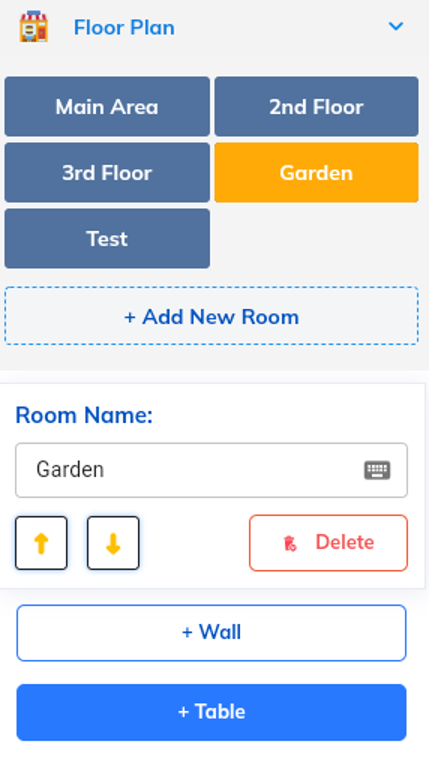
Tap to choose the room or Add New Room
Room name: enter the room name
Up/down => change the room position
Delete room
2. Table
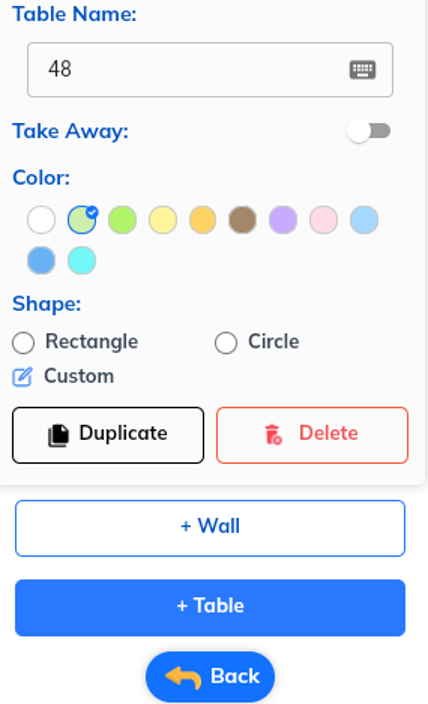
+Table: tap to create a new table
Table name: type the table name
Take away: swipe to turn on/off the “Take away” mode
Color: tap to choose the table color
Shape: you can choose one of table shapes Rectangle/Circle/Custom
Duplicate: make the exact copy of the chosen table
Delete: delete the chosen table
3. Wall
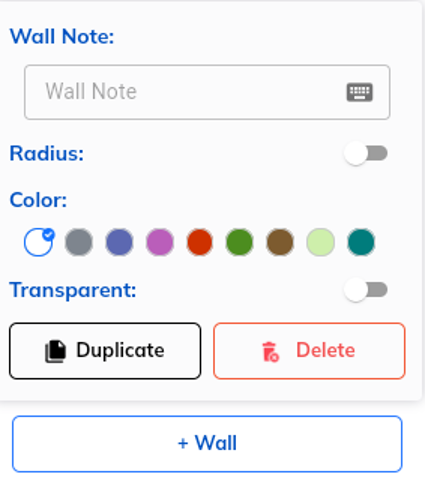
Wall note: you can type the wall note here
Radius: swipe to turn on/off the Radius mode
Color: tap to choose the wall color
Transparent: swipe to turn on/off the transparent mode
Duplicate: make the exact copy of the chosen wall
Delete: delete the chosen wall