
Create vouchers
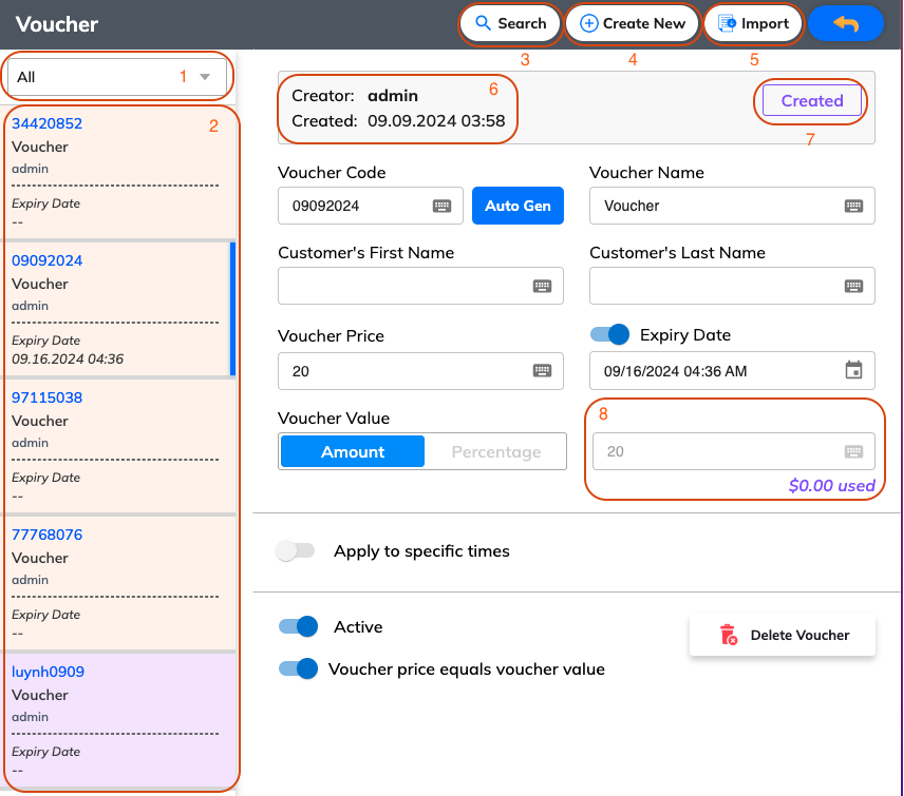
You can sort vouchers regarding their status, such as Available or Used.
List of vouchers: Vouchers are shown here
Search: You can enter voucher code or voucher name to search
Create New: you can tap here to create a new voucher. After that, you can set up the voucher. e.g. voucher code, voucher name, etc.
Import: You can add a csv file to import a list of vouchers instead of creating on POS
The format of a csv file to import vouchers
The information of the creator and the time when the voucher was created
The status of the voucher: Created/Redeemed
The voucher value used
In addition, you can set up Expiry Date, Voucher Value (Amount/Percentage), Apply to specific times mode, Active mode, Voucher price equals voucher value mode.